

Black Friday 2026 is on Friday, November 27, and Cyber Monday follows on November 30. If you run an online store, you have about ten days. That's enough time to fix the things that lose sales (slow pages, a clunky mobile checkout, broken discount codes, wrong stock counts) and not enough time for anything bigger. This checklist is in the order we'd work through it with a client.
What the 2026 forecasts say
Adobe Digital Insights published its holiday forecast on September 28, 2026. The numbers are worth knowing because they tell you where to spend your last ten days.
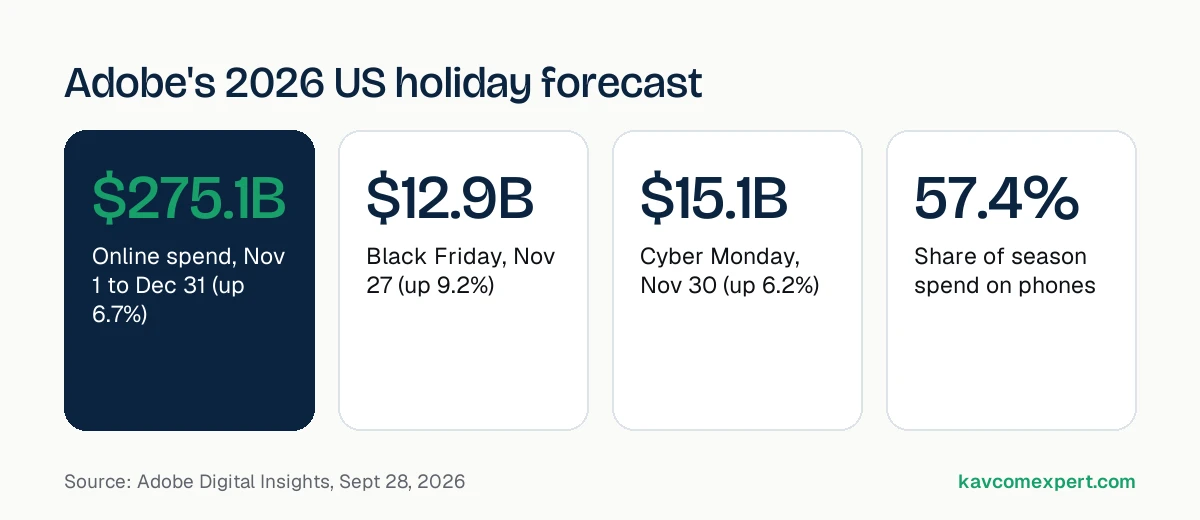
According to Adobe's forecast:
- US shoppers are expected to spend $275.1 billion online from November 1 to December 31, up 6.7% on last year.
- Cyber Week, the five days from Thanksgiving to Cyber Monday, should bring in $47.5 billion, up 7.4%.
- Cyber Monday is forecast at $15.1 billion, which would be the first single day of US online spending over $15 billion.
- Black Friday is forecast at $12.9 billion and growing faster than Cyber Monday, at 9.2%.
- Thanksgiving Day should bring $6.9 billion, with a record 63% of that spend coming from phones.
- Across the whole season, 57.4% of online spend is expected on mobile, and buy now, pay later should account for $21.3 billion.
The practical reading for a small or mid-size store is simple. Most of your holiday buyers will be on a phone, many will arrive from an ad or an email straight onto a product or collection page, and a lot of them will want to split the payment. Those three facts decide the checklist.
The 10-day checklist
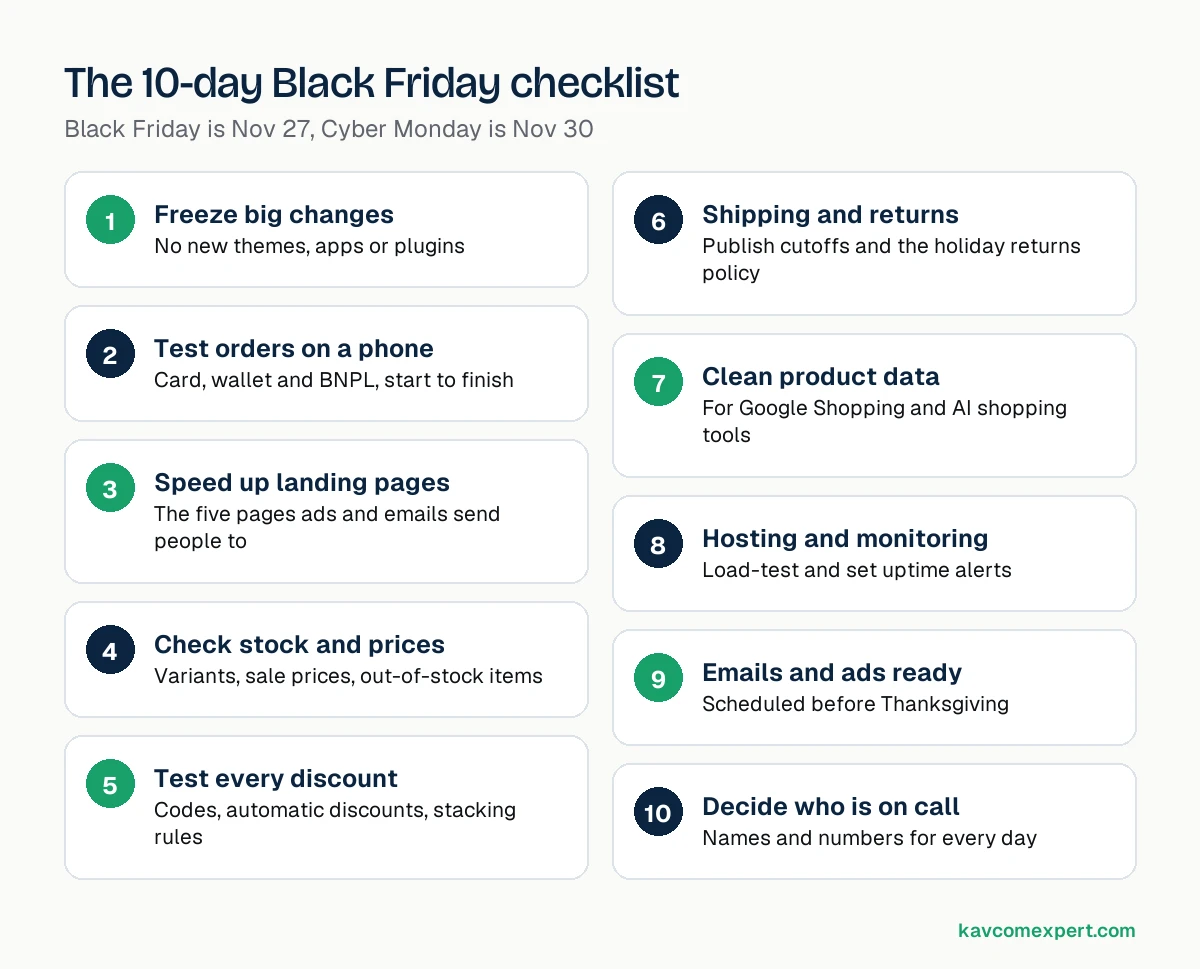
1. Freeze big changes now
Pick a date, ideally November 20, after which nobody installs a new app or plugin, updates the theme, or changes checkout settings. Bug fixes are fine. Anything that could break the cart waits until December.
If you're on WooCommerce, take a full backup (files and database) before the freeze and make sure you know how to restore it. On Shopify, duplicate your live theme so you have a clean copy to roll back to.
2. Place real test orders on a phone
Use an actual iPhone and an actual Android phone, not a desktop browser shrunk down. Go from an ad or email link to a product, add it to the cart, apply a discount code, and pay with each method you offer: card, Apple Pay or Google Pay, PayPal, and your buy now, pay later option. Then refund the orders.
Write down every moment you had to pinch, zoom or wait. Those are the spots shoppers give up.
3. Speed up the pages your traffic will land on
You don't need to make the whole site faster in ten days. List the five to ten pages your Black Friday emails and ads will point to, usually the homepage, one or two collection pages, and your hero products. Then work on those pages only:
- Compress and resize hero images and serve them in WebP or AVIF.
- Remove apps or plugins that load scripts on every page but are only used on one.
- Make sure the product image and price show up without a layout jump.
- Test each page with PageSpeed Insights on mobile and fix the biggest item first.
We've written more about how site speed affects sales and search and about WordPress speed fixes if your store runs on WooCommerce.
4. Check stock, variants and pricing
Run an inventory report and compare it with what your site shows. Overselling a popular size on Black Friday turns into refunds, angry emails and chargebacks. Check that sale prices start and stop at the right time in the right time zone, and that compare-at prices are honest. Inflated "was" prices can get you in trouble with regulators and with Google Merchant Center.
5. Test every discount code and automatic discount
Try each code alone, with other codes, on sale items, and with free shipping. Decide in advance whether codes stack. Then test what happens when someone types the code in lowercase or with a trailing space, because people will.
6. Publish shipping cutoffs and the returns policy
Put the last order date for delivery before the holidays on product pages and in the cart, not only on a shipping page. Shoppers ask "will it arrive in time?" more than any other question in December. A clear answer near the buy button saves you support tickets and abandoned carts.
7. Clean up product data for Google and AI shopping tools
Shopping is moving into AI chats. Shopify's Winter '26 Edition introduced Agentic Storefronts, which make Shopify products discoverable in ChatGPT, Copilot and Perplexity. Whatever platform you're on, these tools and Google Shopping all read the same things: your product titles, descriptions, prices, stock status, shipping costs and return policy.
For your top 20 products, make sure the title says what the product is in plain words, the description answers the obvious questions (size, material, compatibility), and the price and stock in your feed match the site. If you use product schema on WooCommerce, check that it shows the current sale price.
8. Load-test your hosting and set up monitoring
Shopify handles traffic spikes for you. WooCommerce and Magento stores don't get that for free. Ask your host what happens if traffic jumps five or ten times, turn on page caching for everything except the cart and checkout, and set up an uptime monitor that texts you, not just emails you.
9. Prepare the emails and ads now, not on Thursday
Write and schedule your emails ahead of time. Test every link in them. Make sure your ads point to pages that exist, have stock, and show the offer in the first screen on mobile. A Black Friday ad that lands on a generic homepage wastes the click.
10. Decide who is on call
Put names next to jobs for November 26 to 30: who watches orders, who answers chat and email, who can fix the site, and who can pause ads if checkout breaks. Small teams lose the most money when a problem sits unnoticed for half a day.
Platform notes: Shopify, WooCommerce and Magento
The checklist above applies to every store, but each platform has its own weak spots in the week before a sale.
Shopify
Shopify runs the servers, so you don't need to worry about traffic spikes taking the store down. The risk on Shopify comes from apps. Each app you install can add scripts to your storefront, and some keep loading code even after you uninstall them. Open your theme code or ask your developer to search for leftover app snippets, and remove anything from apps you no longer use. Then check your checkout settings, especially if you use discount apps or custom checkout extensions, because those are the parts that tend to clash when several promotions run at once.
WooCommerce
On WooCommerce, the hosting is your responsibility. Ask your host directly how many PHP workers your plan has and what happens when they're all busy. A store that handles 50 visitors at a time without trouble can slow to a crawl at 300. Make sure page caching skips the cart, checkout and my-account pages, otherwise shoppers can see someone else's cart contents or stale prices. Update WooCommerce and your payment gateway plugin before your freeze date, not during the sale week, and run a test order straight after each update.
Magento and Adobe Commerce
Magento stores usually have the most custom code, which means the most places for things to go wrong. Reindex and flush the cache before the freeze, confirm your cron jobs are running (stuck cron jobs are a common reason for wrong stock levels and missing order emails), and check that you're on a release that still gets security patches. If you're on an older 2.4 version, plan the upgrade for the new year rather than the week of the sale.
Payment options shoppers expect in 2026
Adobe expects buy now, pay later to drive $21.3 billion of online spending in November and December, with more than a billion dollars of that on Cyber Monday alone. If you sell anything over about $75, it's worth showing your installment option on the product page, not only at checkout. A line like "or 4 payments of $24.75" next to the price answers the question before the shopper starts to hesitate.
Wallets matter for the same reason. On a phone, typing a 16-digit card number and a billing address is where many carts get abandoned. Apple Pay, Google Pay and Shop Pay let someone pay with a fingerprint or face scan. Check that these buttons actually show on your product and cart pages on mobile, because theme settings sometimes hide them.
If you only have three days
Not everyone reads this with ten days to spare. If you're short on time, do these four things and leave the rest:
- Place a real test order on a phone using each payment method, and fix anything that breaks.
- Check that your top 10 products show the right price and stock.
- Test every discount code you plan to email out.
- Put the holiday shipping cutoff date on product pages and in the cart.
These four catch the problems that cost the most money in the shortest time.
What to skip this close to Black Friday
Some things sound urgent but are a bad idea ten days out:
- Switching themes or redesigning product pages.
- Migrating platforms, payment gateways or hosts.
- Installing a new page builder, popup app or upsell app you haven't tested under load.
- Turning on a new caching or minification plugin without testing checkout afterwards.
Put these on a list for January, when traffic is quieter and you have time to test properly.
After Cyber Monday
Once the rush is over, export your orders, abandoned carts and on-site search terms. Look at which landing pages converted on mobile and which didn't. That's the most useful data you'll get all year for planning next season's site work.
If you'd like a second pair of eyes on your store before Black Friday, our team works on Shopify stores and WooCommerce stores every day. Get in touch and tell us what's worrying you.