
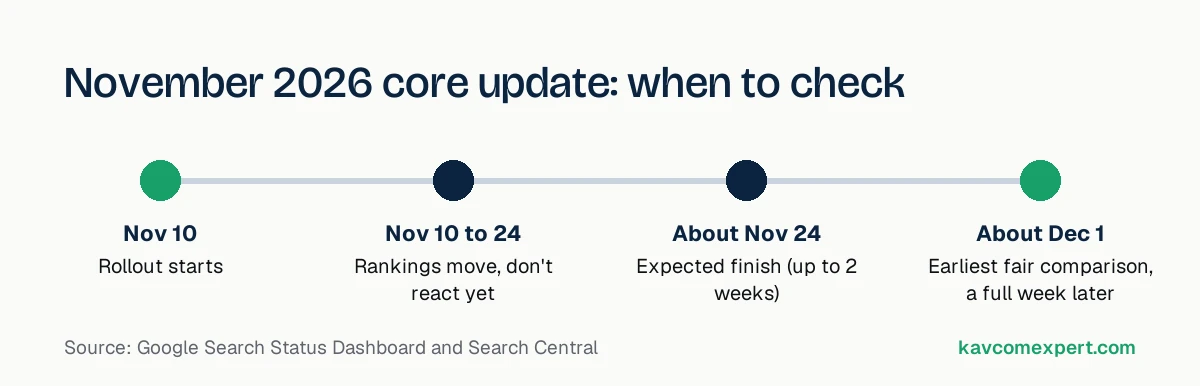
Google began rolling out its November 2026 core update on November 10, and the rollout can take up to two weeks, so it should finish around November 24. If your traffic or rankings are moving this week, the best thing to do is wait, keep notes, and compare properly once the update is done. Google's own advice is to wait at least a full week after the rollout finishes before analyzing your data.
What Google has said so far
The Google Search Status Dashboard lists the update as released on November 10, 2026 at 10:07am Pacific (the incident itself began at 10:06). The entry says it "applies globally and to all languages" and that "the rollout may take up to 2 weeks to complete."
Search Engine Journal reports that this is the third Search core update this year. Google hasn't published a blog post explaining specific goals for this one. It calls it a regular update aimed at surfacing relevant, satisfying content from all types of sites.
What a core update actually changes
A core update is a broad change to how Google's systems judge pages. It isn't aimed at one type of site and it isn't a manual action. Google re-assesses how helpful, reliable and relevant pages are compared with everything else that could rank for the same search. If your pages slip, it often means other pages are now judged more useful, not that you did something "wrong" last week.
That's why the usual quick fixes (changing title tags across the site, adding schema everywhere, deleting old posts in bulk) rarely bring rankings back after a core update.
Core update, spam update or manual action?
People often mix these up, and the right response is different for each. Before you change anything, work out which one you're dealing with.
| Type | What it is | How you find out | What to do |
|---|---|---|---|
| Core update | A broad change to how Google ranks all sites | Search Status Dashboard and the timing of your drop | Improve the usefulness of affected pages over time |
| Spam update | Targets specific spam tactics such as scaled low-value content or link schemes | Search Status Dashboard | Remove the tactic, then wait for systems to re-evaluate |
| Manual action | A Google reviewer has flagged your site for a policy violation | A message in Search Console under Security & Manual Actions | Fix the issue and file a reconsideration request |
| Technical problem | Pages blocked, deindexed or broken on your side | Search Console Pages report, robots.txt, server logs | Fix the error; recovery is usually quick |
If Search Console shows no manual action and your pages are still indexed, and the drop lines up with November 10 to 24, the core update is the likely cause.
What to do this week, while it rolls out
- Write down today's date and any changes you make to the site, so you can separate your changes from Google's.
- Don't make big site-wide changes because of daily ranking swings. Positions bounce around during a rollout.
- Check that tracking works. Make sure Google Analytics and Search Console are still collecting data, so a tracking break doesn't look like a traffic drop.
- Keep publishing and fixing things you'd planned anyway.
How to check the impact once it's finished
Google's guidance on core updates is specific about timing: confirm the update has finished on the Status Dashboard, wait at least a full week, then compare a week after the update with a week before it started.
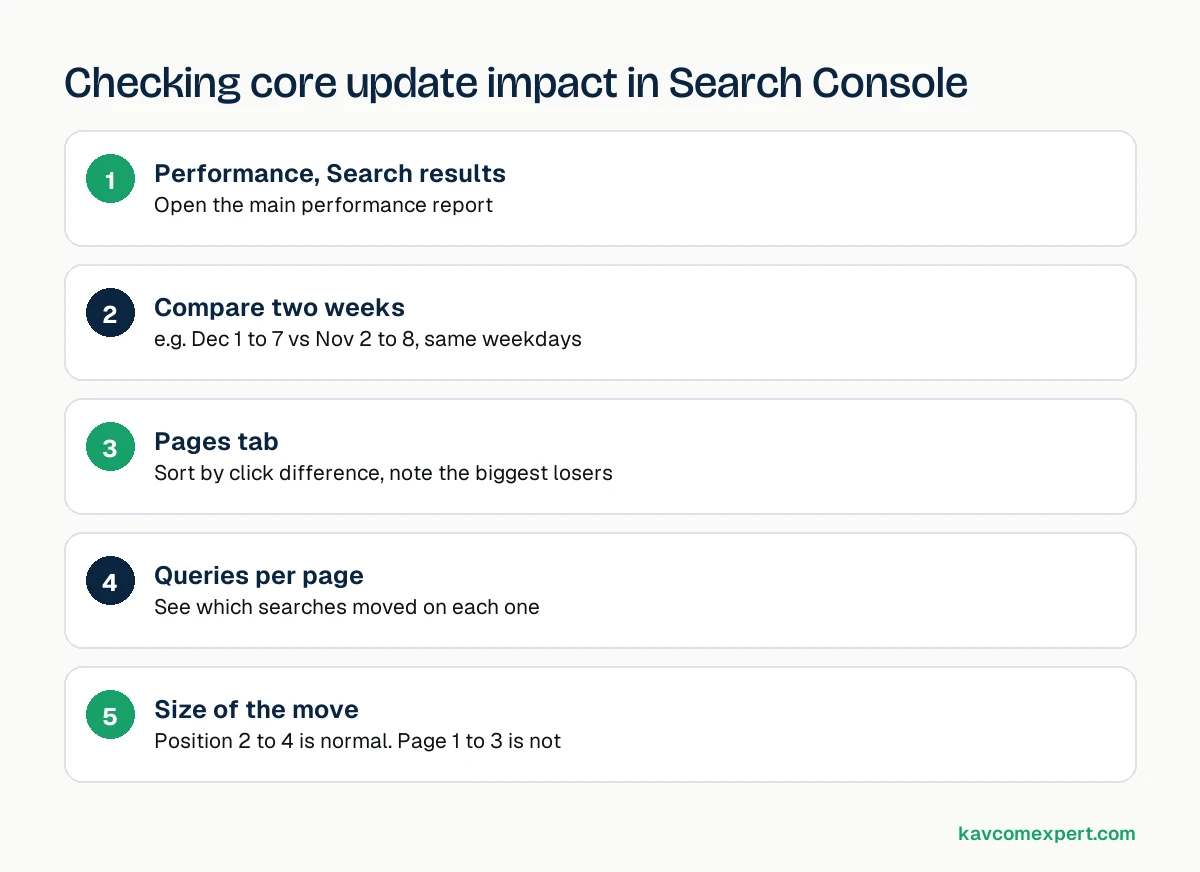
In Search Console, that looks like this:
- Open Performance, then Search results.
- Set a custom date comparison: for example, December 1 to 7 against November 2 to 8. Use the same days of the week on both sides.
- Switch to the Pages tab and sort by the click difference. Note the pages that lost the most.
- Click into each of those pages and open the Queries tab to see which searches moved.
- Check whether a page dropped from position 2 to 4 (normal movement) or from page one to page three (worth a closer look).
If you dropped: what to review
Start with the pages that lost the most clicks, not the whole site. For each one, read it as a stranger would and ask the questions from Google's helpful content guidance:
- Does it give original information, research or analysis, or does it repeat what other pages already say?
- Would someone who read it feel they learned enough to act, or would they go back and search again?
- Is it clear who wrote it and why they're qualified?
- Is the main content easy to find, or buried under ads, popups and filler?
- Is it written for people first, or mostly to catch a keyword?
Then compare it with the pages that now rank above it. Look at what they cover that you don't, how they're organized, and whether they show first-hand experience. Improve the page properly. A thorough rewrite of five important pages does more than a light edit of fifty.
Patterns we see on small business sites that drop
Every site is different, but when we review sites that lost ground after a core update, the same handful of problems come up again and again.
Service pages with almost nothing on them
A page called "Plumbing Services in Dallas" with 150 words, a stock photo and a contact form tells Google very little. Compare that with a competitor page that explains what the service involves, what it costs, how long it takes, which areas are covered, and answers the questions customers actually ask on the phone. The second page is more useful, and it's usually the one that wins after an update.
Blog posts written to fill a calendar
Many small businesses publish a post a week because someone told them to. Over a few years that becomes dozens of short, similar posts that repeat general advice found everywhere else. A handful of those is harmless. A site where most of the content is like that can be judged as less helpful overall. It's often better to merge five thin posts on one topic into a single thorough guide and redirect the old URLs to it.
Content produced at scale without real review
Using AI to help write is fine. Publishing large amounts of AI-written text that nobody with expertise has checked, edited or added to is a different story. Google's guidance asks whether content provides original information and whether it was created mainly to attract search visits. Pages that read like a summary of the top ten results tend to struggle.
Out-of-date information
Prices from 2022, software versions that no longer exist, laws that changed last year. Old facts make a page less trustworthy even if it ranked well when it was written. Updating the facts, the date and the examples on your most important pages is one of the most productive things you can do after an update.
No clear sign of who is behind the site
An About page with no names, posts credited to "admin", and no address or phone number make it hard for anyone, people or search systems, to judge whether the site is reliable. Adding real author names, short bios and clear business details costs very little.
What not to do
A few reactions make things worse, and we see them every time an update rolls out:
- Deleting large numbers of posts in a panic. Some of those pages may have links or traffic you need. Review first, then merge or improve.
- Buying links to "push rankings back up." That risks a spam problem on top of the core update.
- Rewriting every title tag on the site at once. If anything changes afterwards you won't know why.
- Switching themes, hosts or URL structures during the rollout. You'll mix your own changes up with Google's.
- Judging the result after three days. Positions move a lot until the update has finished and settled.
If you went up
Good news, but still check which pages and queries gained. Those pages show you what Google currently rewards on your site. Look at their format, depth and author signals, then use that as the template for the pages that didn't move.
How this fits with AI search
The pages that do well in core updates and the pages that get cited in AI Overviews and ChatGPT tend to share the same traits: a direct answer near the top, specific facts with sources, clear authorship, and a structure that's easy to quote. We covered this in more detail in our guides to zero-click search and AI Overviews and getting your business found by AI.
If the update hit your site and you'd like help working out why, our SEO and AI search team can review your Search Console data and the affected pages with you. You can also start with a free AI search audit to see how Google and ChatGPT describe your business.