
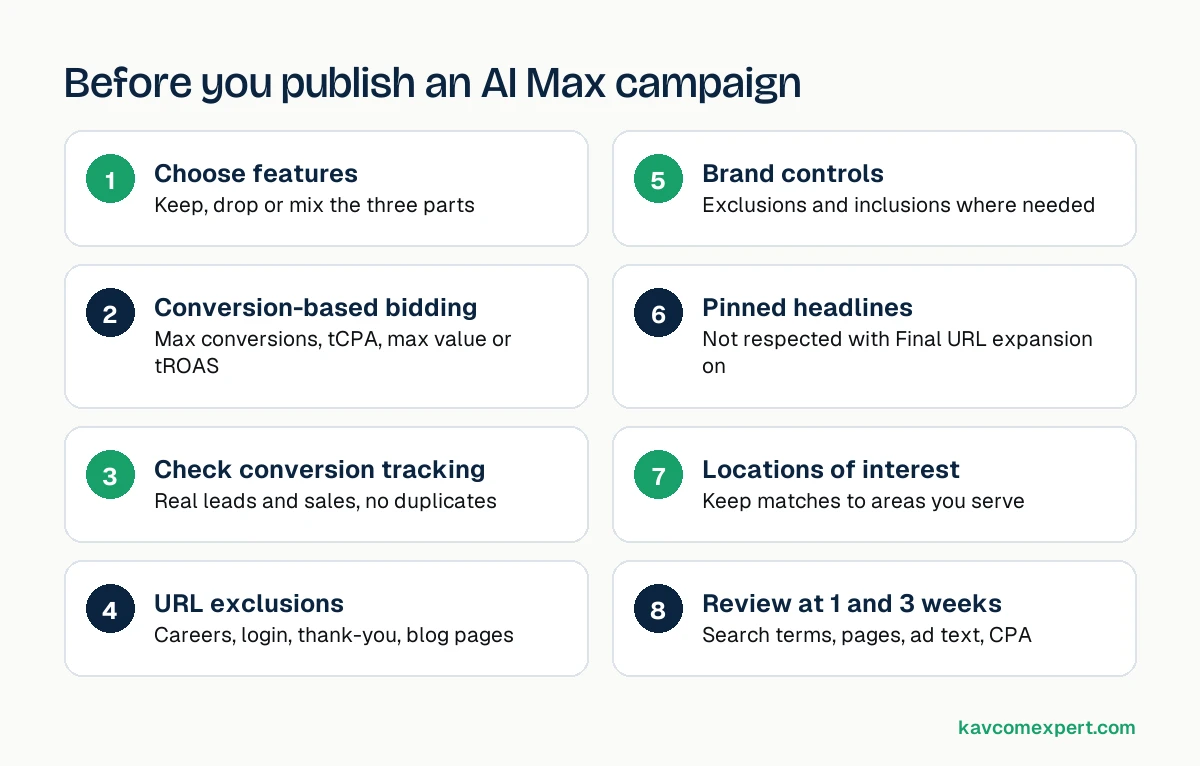
If you build Google Ads campaigns in Google Ads Editor, new Search campaigns now start with AI Max switched on, along with text customization and Final URL expansion. That means Google can show your ads on searches you didn't target, write some of the ad text for you, and send clicks to a different page than the one you picked. None of that is bad on its own, but you should decide it on purpose. Before you publish a new campaign, go through the eight checks below.
What changed
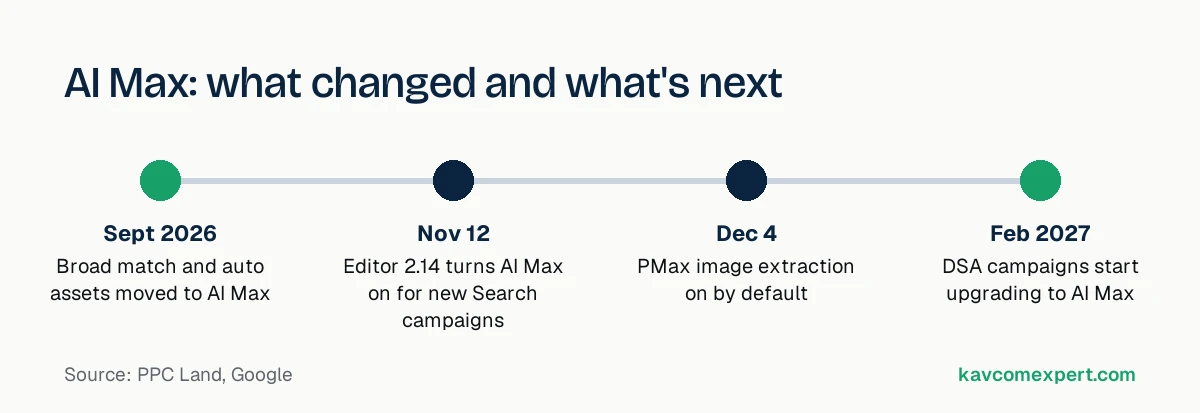
PPC Land reported on November 12, 2026 that Google Ads Editor version 2.14 is out, and quoted the release notes: "AI Max, text asset automation, and Final URL expansion are now activated by default when creating new Search campaigns."
A few things are worth knowing about the scope:
- It applies to new Search campaigns created in Editor. Existing campaigns keep their current settings.
- The notes don't say whether the same default applies when you create a campaign in the Google Ads web interface or through the API. Check the AI Max section of every new campaign, wherever you build it.
- It follows Google's September 2026 migration, when older campaign-level broad match and automatically created assets setups were moved into AI Max. That migration left Final URL expansion off. The new Editor default turns it on.
The same pattern is coming to Performance Max. From December 4, 2026, image extraction will be on by default for newly created Performance Max campaigns, according to the same PPC Land report.
And Google has already said what's next for Dynamic Search Ads. Its announcement on upgrading DSA to AI Max says the automatic upgrade of DSA campaigns begins in February 2027.
What AI Max actually does
AI Max for Search is three features in one setting. Google's guide on how AI Max for Search campaigns works describes them like this:
| Feature | What it does | The risk if you don't check it |
|---|---|---|
| Search term matching | Shows your ads on relevant searches beyond your keyword list, using broad match and keywordless technology | Spend on searches you'd never have chosen |
| Text customization | Writes headlines and descriptions from your landing pages, existing ads and keywords | Ad text that says things you wouldn't, or misses required wording |
| Final URL expansion | Sends a searcher to whichever page on your site Google thinks fits best | Clicks landing on blog posts, careers or other pages that don't convert |
Google's overview of AI Max says advertisers who turn it on "typically see 14% more conversions or conversion value at a similar CPA/ROAS." That figure comes from Google's internal 2025 data for non-retail advertisers. It's an average across many accounts, so it may or may not match what happens in yours.
The 8 checks before you publish
1. Decide which features you want
AI Max isn't all or nothing. You can keep search term matching on and turn off Final URL expansion, for example. In Google's setup guide, Final URL expansion needs text customization, so turning off text customization also turns off Final URL expansion.
A simple rule: if your landing pages are carefully built for each ad group, consider turning Final URL expansion off. If your site has lots of good product or service pages and you're not sure which converts best, leaving it on can help.
2. Check your bidding strategy
Google's setup guide notes that search term matching, Final URL expansion and text customization need conversion-based Smart Bidding to work effectively. That means strategies like Maximize conversions, Target CPA, Maximize conversion value or Target ROAS.
If you're on Manual CPC or Maximize clicks, AI Max has very little to learn from. Either switch to a conversion-based strategy or turn AI Max off for that campaign.
3. Make sure conversion tracking is right
Smart Bidding only works if the conversions it's chasing are real. Before you launch, check that:
- Your main conversion actions are leads, calls or sales, not page views or button clicks
- Conversions are recording (look for recent activity in the Conversions summary)
- Duplicate actions aren't counting the same lead twice
- Offline or CRM conversions are imported if you close sales off the website
Feeding AI Max bad conversion data is the quickest way to spend more on worse leads.
4. Add URL exclusions
If Final URL expansion stays on, tell Google which pages it must never use as landing pages. Common ones:
- Careers and job listings
- Login, account and checkout pages
- Thank-you and confirmation pages
- Blog posts and news articles, unless they convert
- Old offers, discontinued products and policy pages
Google's setup guide describes URL exclusions as the control that prevents traffic from going to specific pages you don't want customers sent to.
5. Set brand controls
AI Max lets you add brand exclusions at the campaign level and brand inclusions at the campaign or ad group level. Use exclusions to stop your ads showing on searches for brands you don't want to be associated with, such as competitors you've agreed not to target. Use inclusions when a campaign should only show on searches that mention specific brands, such as your own.
6. Watch out for pinned headlines
This one catches people out. Google's guide to how AI Max works says that when Final URL expansion is on, pinned assets won't be used if a more relevant URL is chosen. If you pin a legal disclaimer, license number or required brand line, turn Final URL expansion off for that campaign. Regulated businesses (finance, healthcare, legal) should check this every time.
7. Use locations of interest when it matters
AI Max adds a control for locations of interest at the ad group level, so you can reach people based on the geographic intent of their search, even when the match isn't keyword-based. If you serve specific cities or regions, set this up so a broader match doesn't pull in searches for places you don't serve.
8. Plan your first review
Put a date in your calendar one week and again three weeks after launch. On those days, look at:
- The search terms report, adding negative keywords for searches that don't fit
- Which landing pages are getting clicks, if Final URL expansion is on
- The ad text Google generated, removing anything inaccurate
- Cost per conversion compared with your older campaigns
Should a small business keep AI Max on?
It depends on your data, more than on AI Max itself. Here's how we'd usually decide:
- Keep it on if you have reliable conversion tracking, at least a few dozen conversions a month in the account, and several good landing pages.
- Use it partly if you want the extra reach of search term matching but need full control of your ad text and landing pages. Turn off text customization and Final URL expansion.
- Turn it off for now if you have no conversion tracking, a very small budget, strict wording requirements, or one landing page that every click must reach.
If you're unsure, Google offers AI Max experiments that compare a campaign with and without AI Max. A clean experiment over four to six weeks will tell you more than any average.
Why your landing pages matter more now
With Final URL expansion and text customization, Google reads your website to decide where to send people and what to say about you. Pages that clearly explain a service, load quickly and have a single, obvious next step give it better material to work with. Slow or thin pages hurt twice: once in Quality Score and again in the text and page choices AI Max makes. If your site is slow, our guide on how website speed affects SEO and user experience is a good place to start.
Where to get help
Our Google Ads management team sets up and audits AI Max campaigns for small businesses, including conversion tracking, exclusions and the first few weeks of reviews. If you'd like us to look over a campaign before it goes live, send us a message. You can also see how paid search fits with the rest of your marketing on our digital marketing services page.
Sources
- PPC Land: Google Ads Editor 2.14 turns on AI Max by default for new Search campaigns (November 12, 2026)
- Google Ads Help: About AI Max for Search campaigns
- Google Ads Help: How AI Max for Search campaigns works
- Google Ads Help: Set up AI Max for Search campaigns
- Google Ads Help: About AI Max experiments
- Google: Upgrading Dynamic Search Ads to AI Max