

If you want a virtual assistant helping your firm when tax season 2027 opens in January, the time to hire is now. A good assistant needs six to eight weeks to learn your software, your templates and the way your partners like things done. Bring someone on in November or early December, start them on admin work, put the right client consents and security steps in place, and by January they'll be taking real hours off your preparers.
This guide covers what to hand off first, the IRS rules that apply if your assistant works outside the US, and a week-by-week plan from now until the first returns come in.
Why so many firms are doing this
The staffing problem in accounting isn't new, and it isn't going away. A Personiv survey reported by Accounting Today found that 84% of accounting and finance leaders agree there's a talent shortage. That's slightly down from 87% the year before, but well above the 63% who said the same in 2020.
Firms have responded by sending more work outside the office. In the AICPA PCPS and CPA.com survey covered by Accounting Today, 29% of firms said they offshore some work. Among firms with net client fees of more than $10 million, it was nearly three quarters. And 46% of the firms the survey classed as top performers do it.
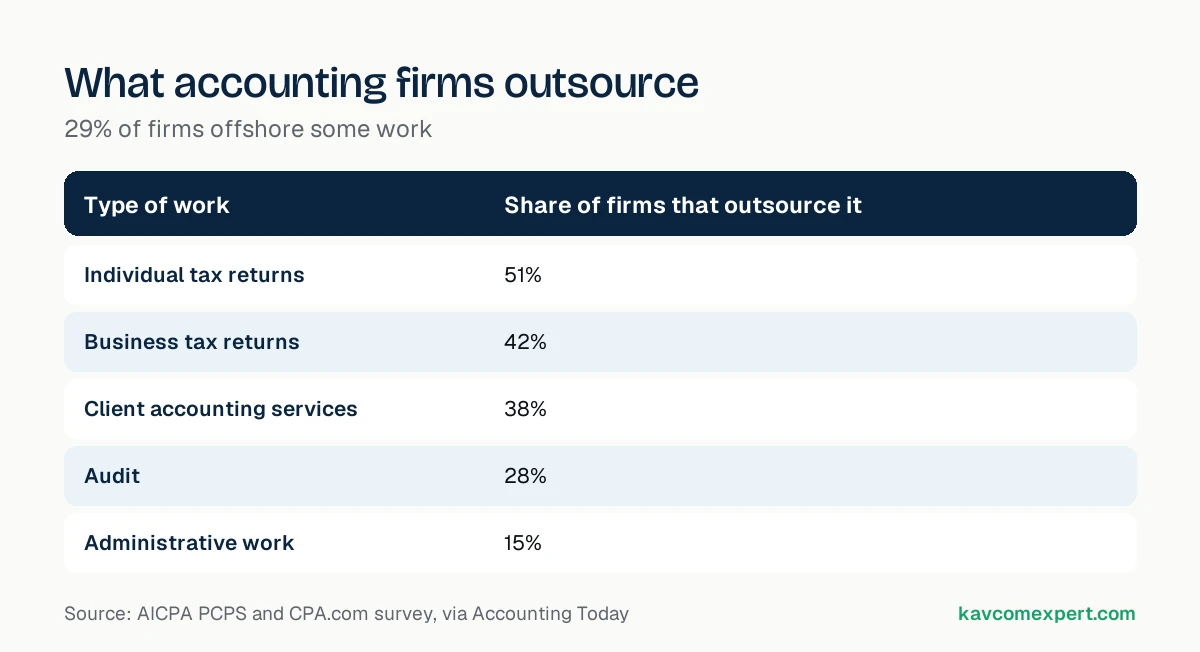
The same survey shows what gets sent out. Individual tax returns lead at 51%, followed by business tax returns at 42%, client accounting services at 38% and audit at 28%. Administrative work sits at 15%, which surprises people. For a small firm, admin is usually the easiest place to start and the place where an assistant pays off fastest, because it's the work that keeps pulling your preparers away from returns.
What to hand off first
The best first tasks are frequent, follow a clear process, and don't need a CPA's judgment. If you write the steps down once, someone else can do them a hundred times.
Client intake and onboarding
Sending engagement letters, organizers and portal invitations. Setting up new clients in your practice management system. Checking that last year's details are still right. This is repetitive work that has to be done for every client, and it all has to happen in the same few weeks.
Chasing documents
Ask any preparer what slows down tax season and you'll hear the same answer: waiting on clients. A virtual assistant can own the follow-up. They check who still owes a W-2, a 1099 or a K-1, send polite reminders on a schedule, call when email doesn't work, and keep a list you can see at a glance. This alone can save each preparer several hours a week in February and March.
Scheduling and the front desk
Booking review meetings, rescheduling, sending reminders, answering "did you get my documents?" emails and routing real questions to the right person. A remote assistant can cover the phone during your busiest hours so your staff can work without interruptions.
E-signatures and filing admin
Sending Form 8879 and other authorizations for signature, tracking who has signed, and nudging those who haven't. The preparer still decides when a return is ready. The assistant handles the paperwork around it.
Billing and collections
Creating invoices when work is finished, sending payment links, following up on unpaid bills and updating your records. Many firms find they collect faster simply because someone is actually doing the follow-up.
Bookkeeping and data entry, under review
If you hire an assistant with accounting experience, they can categorize transactions, reconcile accounts and enter source documents for a staff accountant or manager to review. Keep this under clear review rules, especially in the first season.
What to keep in-house
Some work should stay with your licensed staff, at least for now:
- Tax advice and anything a client might rely on as advice
- Final review and signing of returns
- Conversations about bad news, such as a large balance due or an IRS notice
- Engagement decisions, pricing and scope changes
- Anything you haven't written a clear process for yet
The last point matters more than people expect. If a task lives only in one person's head, handing it to an assistant usually goes badly. Write the process first.
The rules if your assistant is outside the US
Many virtual assistants for accounting firms work from overseas, and that's allowed. But the IRS has specific rules about sharing tax return information, and they apply whether the assistant is a contractor, an agency employee or your own hire. This is a summary, not legal advice, so run your consent forms past your own counsel.
You need the client's signed consent first
Under 26 CFR 301.7216-2, if the person who will receive tax return information is located outside the United States, you need the taxpayer's consent under section 301.7216-3 before you disclose anything to them. That includes your own employees working abroad.
The consent rules in 26 CFR 301.7216-3 say the consent must be signed and dated by the taxpayer. If it doesn't say how long it lasts, it's valid for one year from the date it was signed. So a consent collected for this season won't automatically carry over to the next one.
Social Security numbers have extra limits
Section 301.7216-3(b)(4) adds a further rule for Form 1040 filers: you can't disclose a taxpayer's Social Security number to a tax return preparer outside the US unless an adequate data protection safeguard is in place. Revenue Procedure 2013-14 explains what counts as an adequate safeguard and the required format and wording for consents.
In practice, many firms design the assistant's work so they don't need SSNs at all. Document chasing, scheduling and billing usually don't.
You need a written security plan
The IRS reminds tax professionals that federal law requires preparers to create and maintain an information security plan, and points to Publication 4557, Safeguarding Taxpayer Data, as the starting point. The IRS's Protect Your Clients, Protect Yourself page has more resources. Adding a remote assistant is a good moment to write that plan if you don't have one, or update it if you do.
Security basics that make remote help safe
You don't need an enterprise IT budget. You do need a few habits:
- One person, one login. Give the assistant their own account in every system. Never share a partner's password.
- Multi-factor authentication everywhere. Email, the tax software, the portal, the practice management system.
- Least access. Start with only what their tasks need. Add more as you add responsibilities.
- No files by email. Use your client portal or a secure file share. Turn off downloads where the work doesn't need them.
- A clean exit. Write down every system the assistant can reach, so you can remove access in minutes if they leave.
- A signed agreement. Confidentiality, data handling and what happens to equipment and files at the end.
A week-by-week plan from now to January
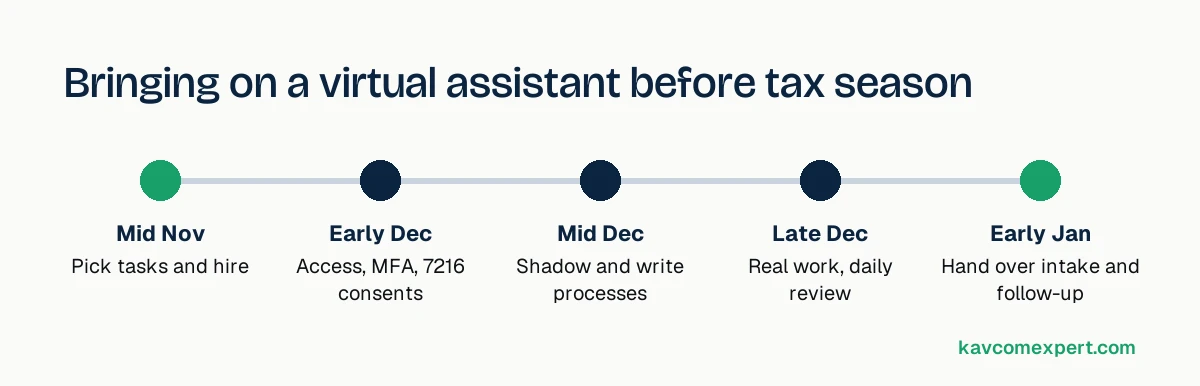
Weeks 1 and 2 (mid to late November): Decide and hire
List the tasks that eat your preparers' time. Pick the five that are most repetitive. Write a short job description around those and interview two or three candidates. Ask them to show you how they'd handle a sample document-chasing email.
Week 3 (early December): Set up access and paperwork
Create accounts with multi-factor authentication, sign the agreement, update your security plan and add 7216 consent language to your engagement letters or organizers if the assistant is offshore.
Weeks 4 and 5: Shadow and document
Have the assistant watch how each task is done today, then write the process up in their own words. You'll find gaps in your own process during this step, and that's useful.
Weeks 6 and 7: Do the work, with review
Let them run the tasks on real clients while someone checks the output daily. Start with onboarding and scheduling, then add document chasing.
Week 8 (early January): Hand over
Move to weekly check-ins and track the numbers below. By the time your first organizers come back, the assistant should be running intake and follow-up on their own.
How to tell if it's working
Track a few simple numbers from the start:
- Hours your preparers spend on admin each week, before and after
- Days from organizer sent to all documents received
- Unpaid invoices older than 30 days
- How many returns each preparer finishes per week in February and March
The goal isn't for the assistant to be busy. It's for your licensed staff to spend more of their time on review and advice, the work clients pay most for.
Common mistakes
- Hiring in February. You'll spend your busiest weeks training. Hire before the rush.
- Handing over undocumented work. If the steps aren't written down, results will vary and you'll take the task back.
- Sharing one login. It breaks your audit trail and your security plan.
- Forgetting the consent forms. If the assistant is offshore and touches return information, get the signed consent before they start.
- Expecting tax judgment. An admin assistant should escalate questions, not answer them.
Where to get help
We place and manage trained virtual assistants for accounting firms, covering intake, document follow-up, scheduling, billing and bookkeeping support. If you're a firm in Texas, our CPA marketing agency page for Houston firms explains how we combine assistant support with marketing. You can see an example of our work for an accounting practice in the Phillips Business Group website project, and if you're budgeting for next year, our guide to digital marketing costs for a CPA firm breaks down typical numbers.
If you'd like to talk it through, book a free fit call and tell us which tasks are slowing your team down.
Sources
- Accounting Today: Making outsourcing work for your accounting firm (AICPA PCPS and CPA.com survey)
- Accounting Today: Accounting talent shortage surges (Personiv survey)
- 26 CFR 301.7216-2: Permissible disclosures or uses without consent of the taxpayer
- 26 CFR 301.7216-3: Disclosure or use permitted only with the taxpayer's consent
- IRS Revenue Procedure 2013-14
- IRS Publication 4557: Safeguarding Taxpayer Data
- IRS: Protect Your Clients, Protect Yourself